Updating an Image with the paperlesspaper API
Sometimes you just want to swap the image shown on an ePaper screen: no complicated flows, no signed URLs, no extra metadata. This tutorial shows the simplest way to upload a new image using the paperlesspaper API via:
- Paper upload:
POST /papers/uploadSingleImage/:paperId
We’ll focus on the single-image upload flow end to end: pick the target, upload the file, and verify the result.
What you’ll need
- The API base URL:
https://api.memo.wirewire.de/v1 - API key (
x-api-key: ...) - A
paperId - A local image file (PNG works best)
Getting the API key
Visit the API documentation to learn about how to generate an API key.
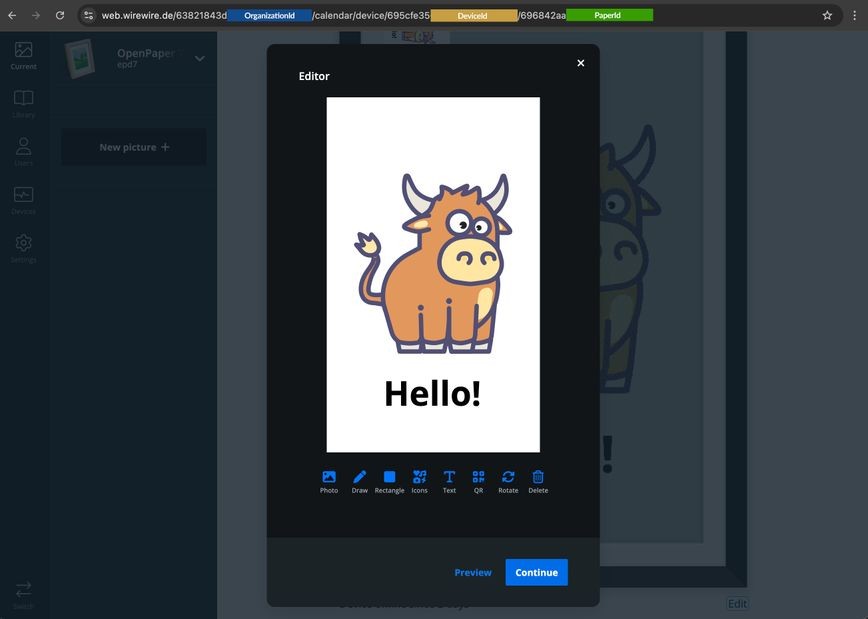
Uploading to a Paper (screen entry)
To retrieve the ID of the image/page (we call them paper) you want to update, visit any of your pictures available. The last part of the URL inside the editor is the paperId.
Endpoint POST /papers/uploadSingleImage/:paperId
The simple upload: cURL
Upload a single image to a Paper
curl -X POST "https://api.memo.wirewire.de/v1/papers/uploadSingleImage/<PAPER_ID>" \
  -H "x-api-key: <API_KEY>" \
  -F "picture=@/path/to/image.png;type=image/png"
Now refresh the Current tab inside the webapplication to see if the image has updated.
node.js
If you prefer code over terminal commands, here’s the same flow using fetch + FormData. Send a multipart request with a single picture field, and you’re done.
Upload to a Paper
import fetch from "node-fetch";
import FormData from "form-data";
import fs from "fs";
import path from "path";

const API_BASE = "https://api.memo.wirewire.de/v1";
const API_KEY = process.env.PAPERLESSPAPER_API_KEY;

export async function uploadPaperImage(paperId, filePath) {
  const form = new FormData();
  const filename = path.basename(filePath);
  form.append("picture", fs.createReadStream(filePath), { filename });
  const res = await fetch(`${API_BASE}/papers/uploadSingleImage/${paperId}`, {
    method: "POST",
    headers: {
      "x-api-key": API_KEY,
      // Important: node-fetch won't auto-add the multipart boundary header.
      ...form.getHeaders(),
    },
    body: form,
  });
  return res.json();
}
A working example of the code can be found in our node-samples.
This is just a first tutorial on how it works. If you have any questions please open an Issue on Github.